
MyHeritage Photo Enhancer is free for several photos once you create a free MyHeritage account, and those photos carry a MyHeritage logo. To enhance more, you need a subscription: a photo-only plan, sold in MyHeritage's Reimagine app at $49.99 a year, or the Complete plan, which adds the family tree and the record searches.
If you only want a handful of old photos repaired, paying per photo costs less. Here are five tools that repair them without a MyHeritage plan. FixFade is ours, and bestphoto.ai comes from the same team.
- 01FixFade, for a few photos: pay once for the ones you repair, with nothing to renew.
- 02bestphoto.ai, if you'd rather pay monthly: its smallest plan works out to about 14¢ a restore.
- 03VanceAI, for a one-time pack, or a Windows app for big batches.
- 04PicWish, for the lowest price per photo.
- 05Hotpot, to try several finishes on one portrait.
What MyHeritage's photo tools do, and which plan covers them
MyHeritage has four photo tools for old photos. Each gives you a few tries without paying, then needs a plan.
| Tool | What it does | Without paying | Unlimited with |
|---|---|---|---|
| Photo Enhancer | Sharpens blurry faces and raises the resolution | Several photos, with a MyHeritage logo | Photo plan, Complete or Omni |
| Photo Repair | Fixes scratches, tears, holes and stains | Several photos | Photo plan, Complete or Omni |
| In Color | Colorizes black-and-white photos and restores faded color | Several photos, with a MyHeritage logo | Photo plan, Complete or Omni |
| LiveMemory | Turns a photo into a six-second video | A limited number | 20 a year with the Photo plan, 30 with Omni |
From MyHeritage's help pages. On a phone, scroll sideways for every column.
MyHeritage doesn't publish how many free tries you get; its pages say “several.” Enhanced photos are saved on your MyHeritage family site, where other members may see them, depending on your privacy settings.
The photo-only plan also comes monthly, at $7.99, and the yearly one starts with a 7-day free trial, according to MyHeritage's help page. In the US, the Complete plan costs about $200 for the first year and about $300 a year after that.
Paying for the tree doesn't always cover the photos. One App Store reviewer, already paying for a MyHeritage plan, wrote: “After only a handful of generations, I was prompted to purchase an additional Photo plan just to continue using the feature.”
Subscription or per photo: count the photos you'll use
If you're building a family tree and searching records on MyHeritage, the Complete plan is the one to have, and its photo tools come with it. Use them.
If you came for the photos, count them first: the ones you'll print, frame or share this year. Repair those, and leave the rest as plain scans until someone asks for one. On FixFade, 25 repairs cost $19, paid once, against $49.99 a year for MyHeritage's photo-only plan.
- Repair the photo going into a frame, a book, a funeral board or a tree profile.
- Repair the photo where damage crosses a face.
- Scan the rest and keep the scans until you need them.
1. FixFade: best if you only need a few photos repaired
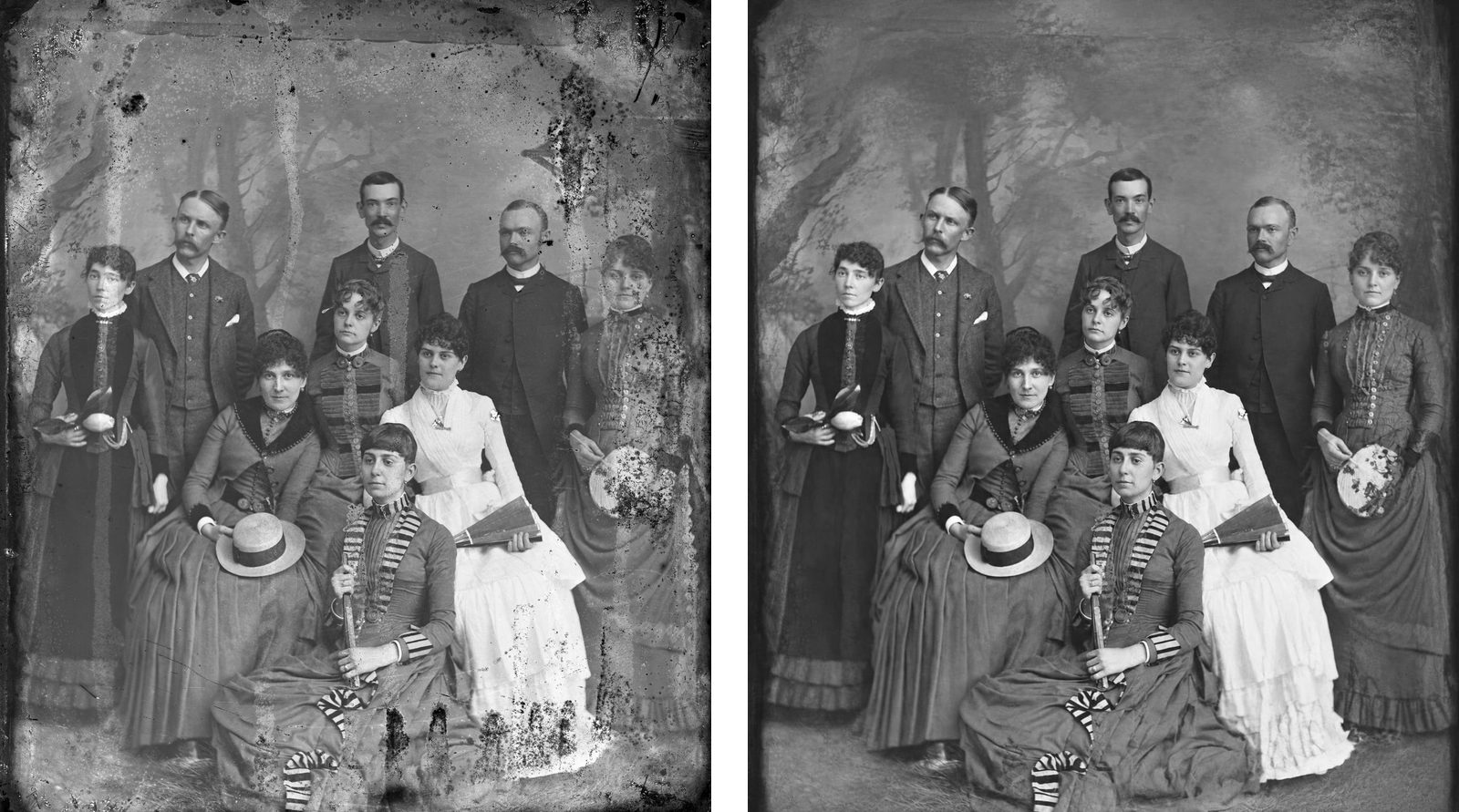
FixFade repairs one photo at a time in your phone's browser, with nothing to install. In about a minute it mends tears, scratches, creases, stains and fading, and black and white stays black and white.
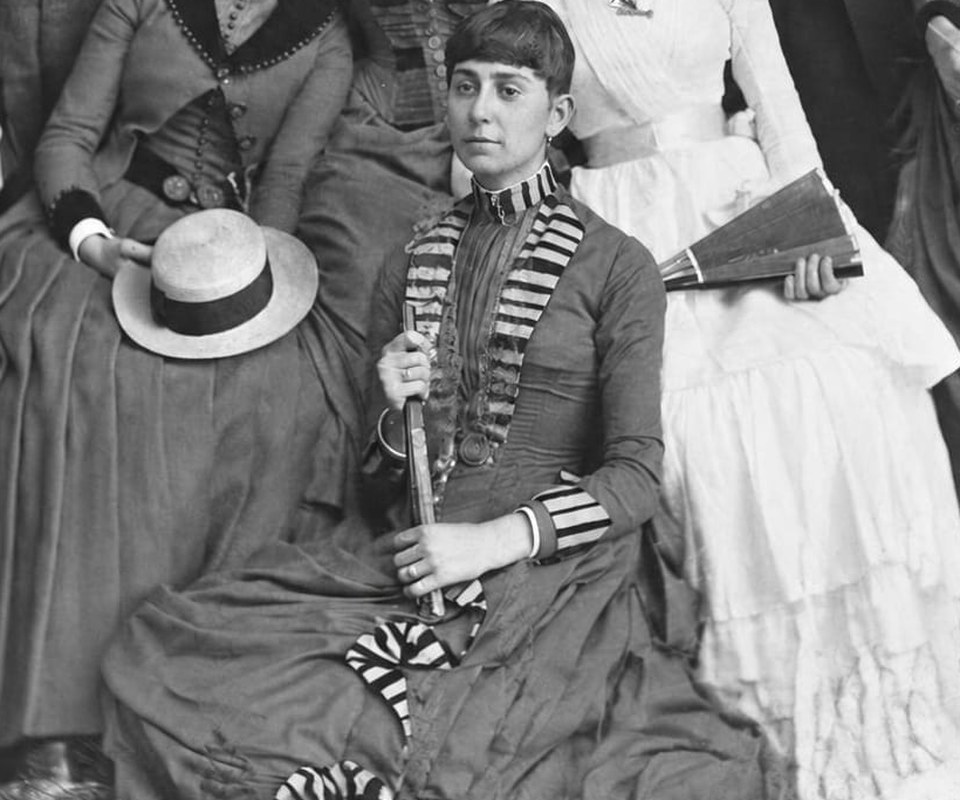
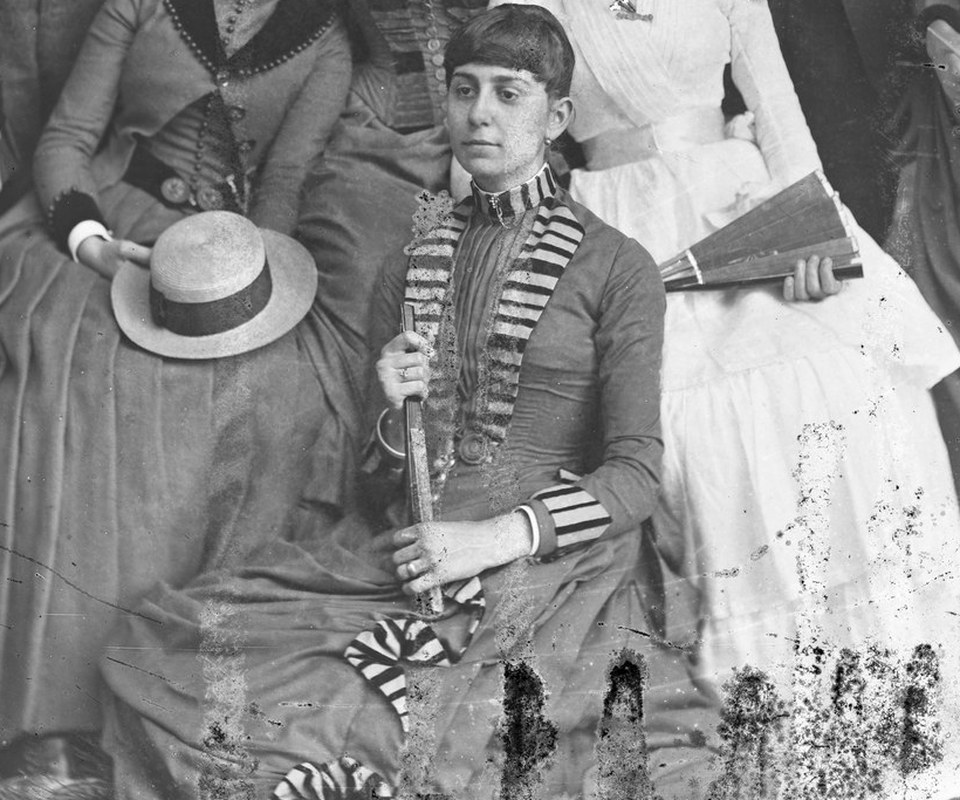
Drag the line to compare the scan with the repair.
Try it on the photo you have in mind first: upload it for one of 2 free watermarked previews a day, no card needed. Each clean 2K PNG after that uses 1 credit, and packs run from $19 for 25 to $89 for 200, so a photo costs 44.5¢ to 76¢.
Photos stay private, and FixFade doesn't train its own models on your photos. MyHeritage is the better choice if you also want the family tree, the record searches and DNA matches: its Complete plan gives you those with the photo tools included.
2. bestphoto.ai: best if you'd rather pay monthly
bestphoto.ai's Restore Photos tool repairs the same kinds of damage, with two watermarked tries a day and no account needed. Its smallest monthly plan, $14 for 300 credits at 3 a restore, comes to about 14¢ a photo. Plan credits reset each month, though member credit packs, from $9.99 for 200, never expire.
Better than us if you'll repair dozens of photos every month.
3. VanceAI: best for a one-time pack and big batches on Windows
VanceAI's old photo restorer repairs scratches, tears, stains and fading, and VanceAI says it sharpens eyes, hair and skin texture too. You can try it without an account: the web app starts you with 10 free credits, and a restore uses 4. The free result had no watermark.
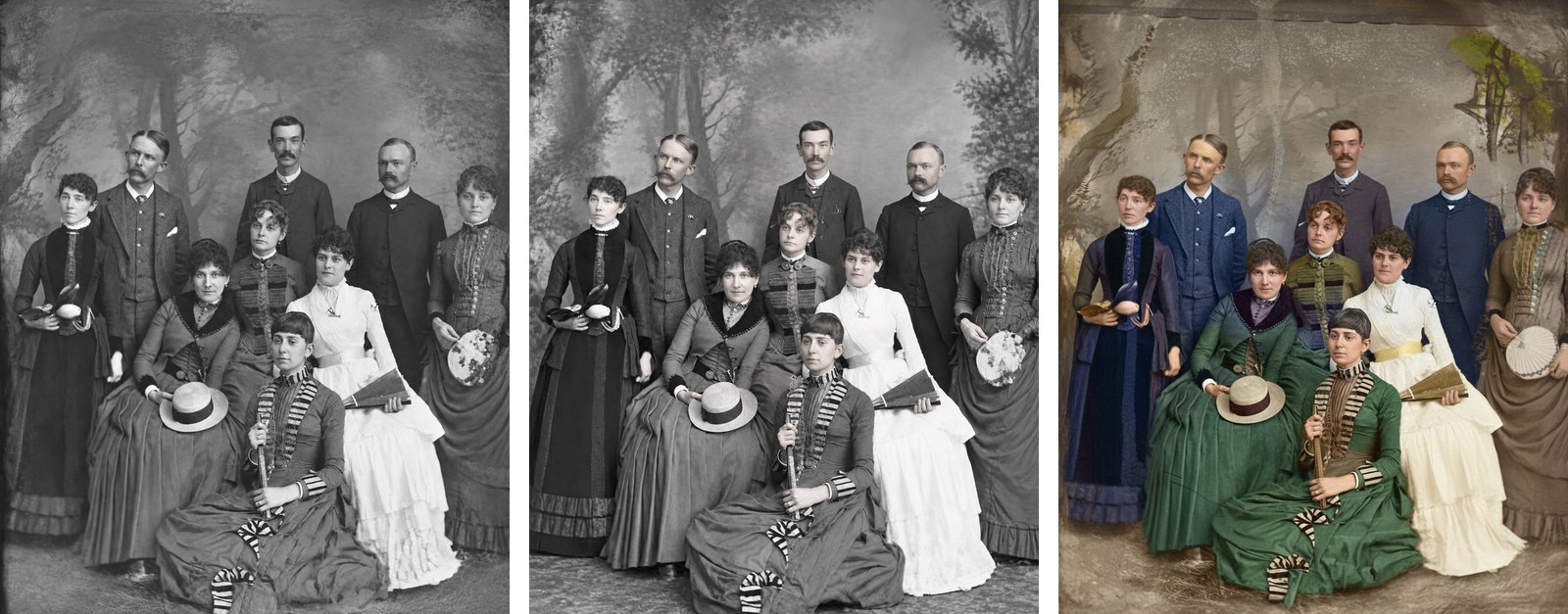
On this photo, VanceAI added color without being asked, and it left the pale streak at the top of the backdrop. FixFade and bestphoto.ai kept it black and white.
VanceAI's pay-as-you-go packs are one-time purchases, from $40 for 200 credits, and the credits last a year. At 4 credits a restore, that's 48¢ to 80¢ a photo, and subscriptions start at $15 a month, billed yearly.
Better than us if you want color added in the same step, or you have hundreds of photos to run on a Windows PC: VanceAI for PC costs $129.90 once.
4. PicWish: best for the lowest price per photo
PicWish's Restore Old Photo asks how damaged the photo is (mild, moderate or severe), then lets you describe touch-ups in a sentence. PicWish says it gives a few free uses.
Its pay-as-you-go credits are a one-time purchase that never expires, from $12.99 for 300. A restore starts at 2 credits, so a photo can cost under 10¢.
Better than us if you want the lowest price per photo, or you'd use its other tools, such as background removal.
5. Hotpot: best for trying different finishes
Hotpot's Photo Restorer lets you choose a finish after you upload: classic or modern black and white, natural color, vintage and others. You can try it free. Its own page warns that the tool “may not work well with more than two people,” so check every face in a family group.
Credits are paid once, from $12 for 1,000. Hotpot doesn't list a fixed cost per restore; it says the cost depends on the tool and its settings.
Better than us if you want to compare several looks for one portrait, such as a soft black and white next to a color version.
MyHeritage's plans next to the five
| Tool | How you pay | Per photo | Free try | Account to try |
|---|---|---|---|---|
| FixFade | One-time packs from $19, credits never expire | 44.5¢ to 76¢ | 2 watermarked a day | No |
| bestphoto.ai | Monthly plan from $14 | About 14¢ on that plan | 2 watermarked a day | No |
| VanceAI | One-time packs from $40, credits last a year | 48¢ to 80¢ | 10 credits, two restores | No |
| PicWish | One-time packs from $12.99, credits never expire | From about 9¢ | A few uses | Not stated |
| Hotpot | One-time credits from $12 | Depends on the settings | Yes | Not stated |
| MyHeritage photo-only plan | $49.99 a year or $7.99 a month, in the Reimagine app | Unlimited while you pay | Several photos, with a logo | Yes |
| MyHeritage Complete | About $200 the first year, then about $300 a year | Unlimited while you pay, with the tree and records | Several photos, with a logo | Yes |
US prices. On a phone, scroll sideways for every column.
Each tool redraws a hidden face its own way
Sharpening a face is a guess. MyHeritage says so about its own enhancer: the results “may be inaccurate and, in rare cases, even distorted.” Every tool on this list guesses too, most of all where damage covers a face.
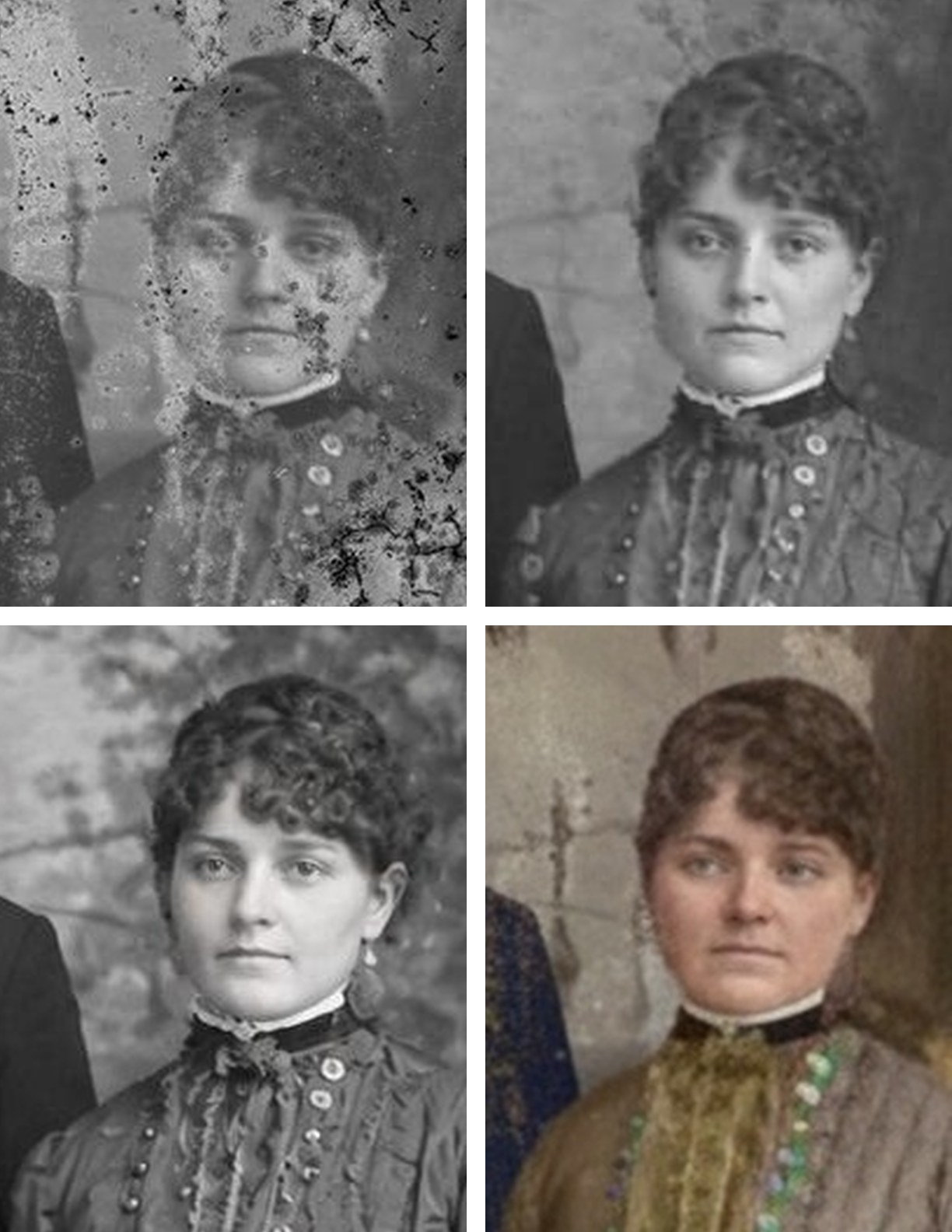
Spots hid most of this woman's face, and each tool filled them in differently: FixFade with heavy-lidded eyes and loose curls, bestphoto.ai with tight curls, wide-open eyes and smooth, bright skin, and VanceAI with a softer, rounder face in color. Each is a guess at what the spots covered, and they can't all be right.
Before you attach a repair to a tree profile, hold it next to the print and any other photo of the same person. Keep the scan, and share the copy that still looks like them.
MyHeritage for the tree, FixFade for a few photos
If you're building a tree and searching records, stay with MyHeritage's Complete plan and use the photo tools it includes. If you came for the photos, repair the few you'll use with FixFade and pay once. Pick bestphoto.ai if you'd rather pay monthly, VanceAI for a Windows batch, PicWish for the lowest price per photo, and Hotpot to compare finishes.
For desktop programs that keep the photo on your computer, see the best photo restoration software and apps, and to make a repaired photo move, see the Deep Nostalgia alternatives. If the photos still need scanning, the Photomyne review covers the scanning-app route and our Legacybox review the mail-in one.