
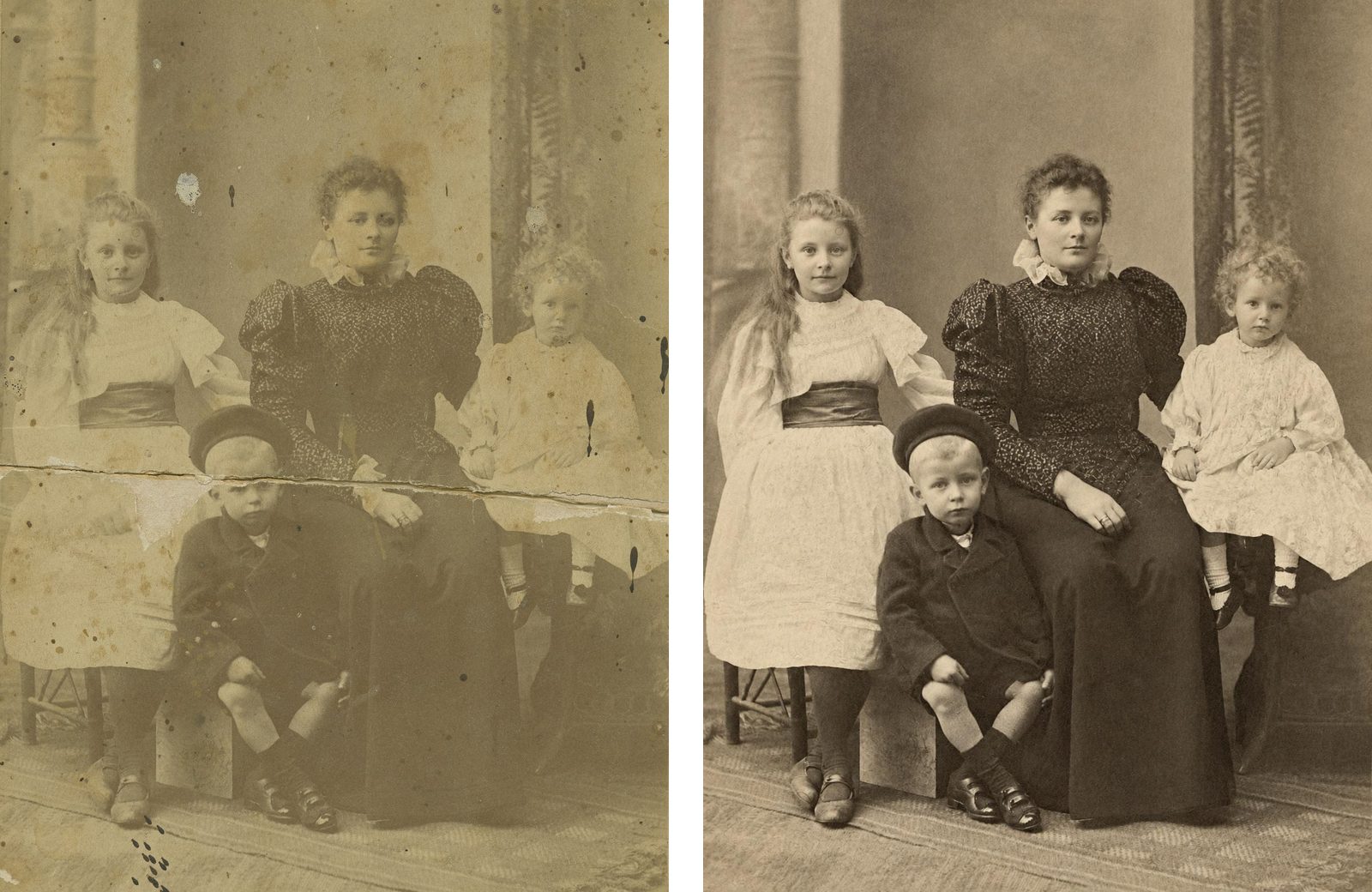
If you want a damaged family photo repaired without learning anything, the best restoration software is a web tool: you upload a scan or a phone photo of the print, and the cracks, stains and fading are mended in about a minute, with nothing to install. If the photo must stay on your computer, use a desktop program instead.
Here are five, with the reason to pick each. We make FixFade, and bestphoto.ai is made by the same team.
- 01FixFade, for one photo or a shoebox of them: nothing to install, packs from $19 paid once, and credits never expire.
- 02bestphoto.ai, if you'll restore photos every month: the same kind of repair on a monthly plan.
- 03Photoshop Elements, if the photo should stay on your computer: one price for three years, on Windows or Mac.
- 04PhotoGlory, for a Windows PC: one price, and it works offline.
- 05Remini, for a blurry face on your phone: an app paid by the week.
Desktop, web or phone: choose by the trade-off
All three kinds now repair scratched, faded photos on their own. What differs is where your photo goes, how you pay, and how much of the fix is left to your hand.
A desktop program keeps the photo on your computer. You pay once, and when the automatic repair misses a spot, you brush it out yourself. That brushwork is a skill you pick up as you go.
A web tool needs nothing installed. You upload the photo, the repair comes back in your browser, and you pay per photo or by the month. The photo does leave your computer to be repaired.
A phone app is the quickest to reach for. Remini, the one on this list, bills by the week, and the first thing it promises is sharper faces.
1. FixFade: best if you don't want to install or learn anything
FixFade works in your phone's browser, nothing to install. Upload the photo and in about a minute it mends tears, cracks, creases, stains and fading. There are no sliders or brushes to learn.
It keeps the photo's own look: black and white stays black and white, and sepia stays sepia unless you ask for color. The print at the top of this page came back brown, the way it was printed in 1897. Where the crack ran across the boy's eyes, it had to draw them in, as the close-up further down shows.
You can see the repair before you pay: upload a photo for one of 2 free watermarked previews a day, no card needed. A clean copy, a 2K PNG in the photo's own proportions, costs 1 credit. You pay once for a pack, from $19 for 25 credits to $89 for 200, so a photo costs 44.5¢ to 76¢, and credits never expire.
The trade-off is the upload. Photos stay private, and FixFade doesn't train its own models on your photos, but each one is sent online to be repaired. Better than us if the photo mustn't leave your computer, or if you want to brush in the last fix yourself: that's what a desktop program is for.
2. bestphoto.ai: best if you'll restore photos every month
bestphoto.ai's Restore Photos tool repairs scratches, tears, creases and stains, and you can try it twice a day without an account. Those free results carry a watermark.
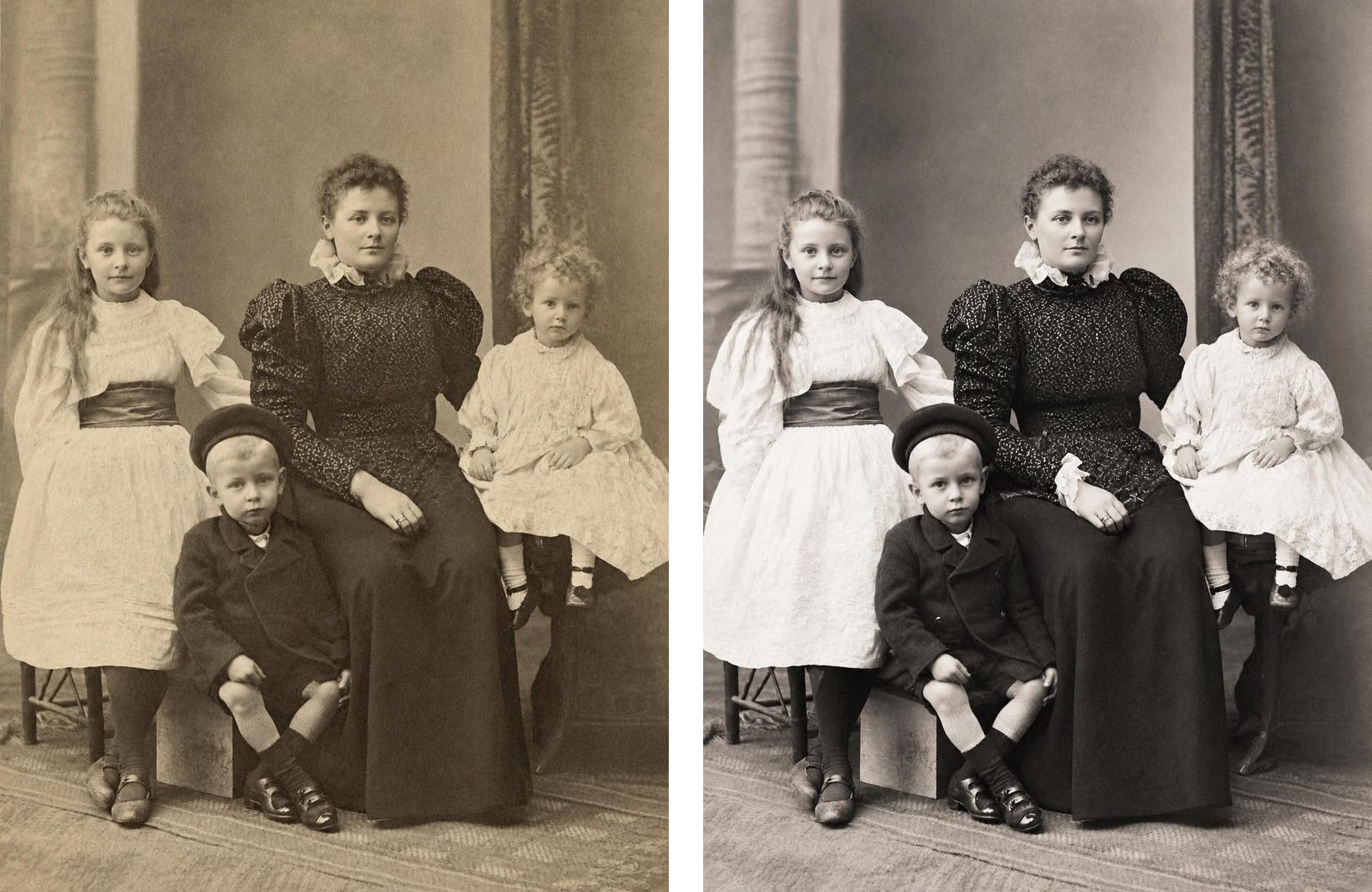
Both closed the crack and cleared the stains. bestphoto's came back crisper and in neutral grey; FixFade kept the brown of the original print.
bestphoto runs on monthly plans. The smallest is $14 a month for 300 credits, and a restore costs 3, so about 100 restores at 14¢ each. Unused plan credits don't carry over to the next month.
Better than us if you'll restore more than a handful of photos every month, or you'd like other tools in the same place, from colorizing to animation.
3. Photoshop Elements: best if the photo should stay on your computer
Photoshop Elements is Adobe's photo program for home use, on Windows and Mac. Its Restore Photo command, in the Enhance menu, repairs faded and scratched photos automatically, and Adobe says it fixes creases too. Whatever it misses, you brush out with the Remove tool.
Restore Photo downloads its AI model to your computer the first time you use it. After that, Adobe says, you can use Elements offline.
Elements 2027 costs $99.99, paid once, for a three-year term, with a free 7-day trial.
Better than us if you want the photo to stay on your computer, want to brush in the final fix yourself, or will edit plenty of other photos in those three years.
4. PhotoGlory: best for a Windows PC and a one-time price
PhotoGlory is a Windows program made for old photos: scratches, creases, stains, tears, faded color and one-click colorizing. Its maker says it "works entirely offline." There's no Mac version.
You buy it once: Standard $27.50, Deluxe $42 and PRO $56, often discounted, with a year of free updates. Only PRO lists automatic restoration. In the cheaper editions you repair with tools you work yourself.
Better than us if you have a Windows PC, want everything to stay offline, and don't mind doing part of the repair by hand.
5. Remini: best for a blurry face, on your phone
Remini is an iPhone and Android app for making blurry photos sharp. Its App Store listing says it can "Repair old/blurry/scratched photo," and the first thing it lists is turning faces into high definition.
It's paid by subscription. In the US App Store, Remini Pro is $9.99 a week, lighter weekly plans start at $4.99, and the app shows ads. Photos are uploaded to be enhanced, and its maker says it deletes them after one day.
Better than us if the photo is blurry rather than damaged, you want it done inside an app, or you'll fix a stack of photos in a single week. For how app subscriptions work when you cancel, see what Photomyne costs.
All five in one table
| Tool | How you pay | Runs on | Your photo | Free try | Tears, per the maker |
|---|---|---|---|---|---|
| FixFade | Per photo, 44.5¢ to 76¢, one-time packs from $19 | Any browser, phone or computer | Uploaded | 2 watermarked a day, no account | Yes |
| bestphoto.ai | Monthly plan from $14 (about 100 restores) | Any browser, phone or computer | Uploaded | 2 watermarked a day, no account | Yes |
| Photoshop Elements | $99.99 once, for 3 years | Windows, Mac | Stays on your computer (offline after a one-time download) | 7-day trial | Not listed (creases and scratches are) |
| PhotoGlory | $27.50 to $56 once, often discounted | Windows | Stays offline | Trial download | Yes |
| Remini | Weekly plans, Pro $9.99 a week | iPhone, Android | Uploaded, deleted after a day | Free with ads | Not listed (scratches are) |
Scroll sideways for every column. US prices.
How to tell if a repair worked
Judge a result by whether the damage is gone, not by how sharp it looks. Zoom in where the crack or stain was. Then compare the faces it crossed with the print.
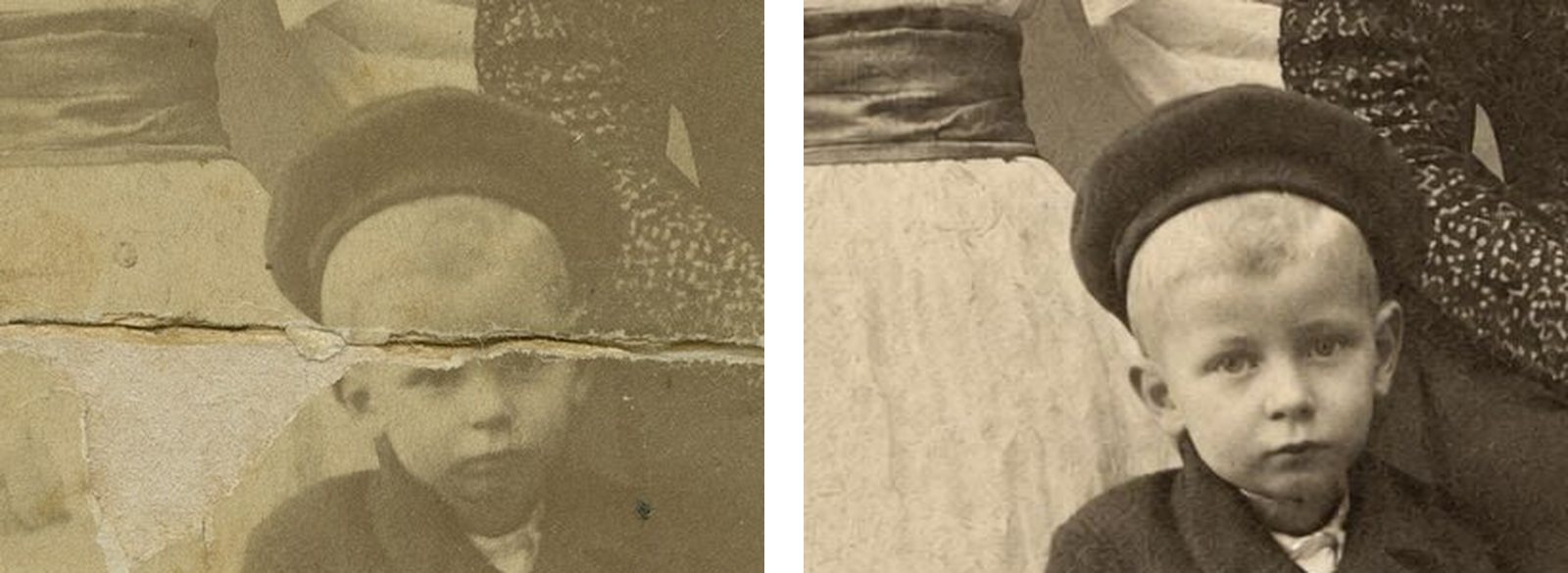
Here the software had to draw his eyes, which sat on the crack. It also closed the gap the crack had opened, so his face came back a little fuller and higher than in the scan.
He still reads as the same boy, but a rebuilt face is a guess. Check it against the print, and against other photos of him, before you share it.
Which to choose for a damaged print
For a damaged family print, start with FixFade: see the repair free, then buy a pack once, with nothing to cancel. Pick bestphoto.ai instead if you'll restore photos every month. If the photo must not leave your computer, buy Photoshop Elements for Windows or Mac, or PhotoGlory PRO for Windows. Remini suits a blurry face more than a cracked print.
Whichever you pick, keep the print and your first scan, and share the repaired copy. For more repairs across the decades, see archive photos before and after restoration. If you'd like the repaired photo to move, see the Deep Nostalgia alternatives, and if you're weighing a genealogy subscription, see what MyHeritage Photo Enhancer costs.